- nouz
- Help centre
- Setting up your costs
- Why does a cost show where it came from?
Setting up your costs Answer 10 of 46 Updated
Why does a cost show where it came from?
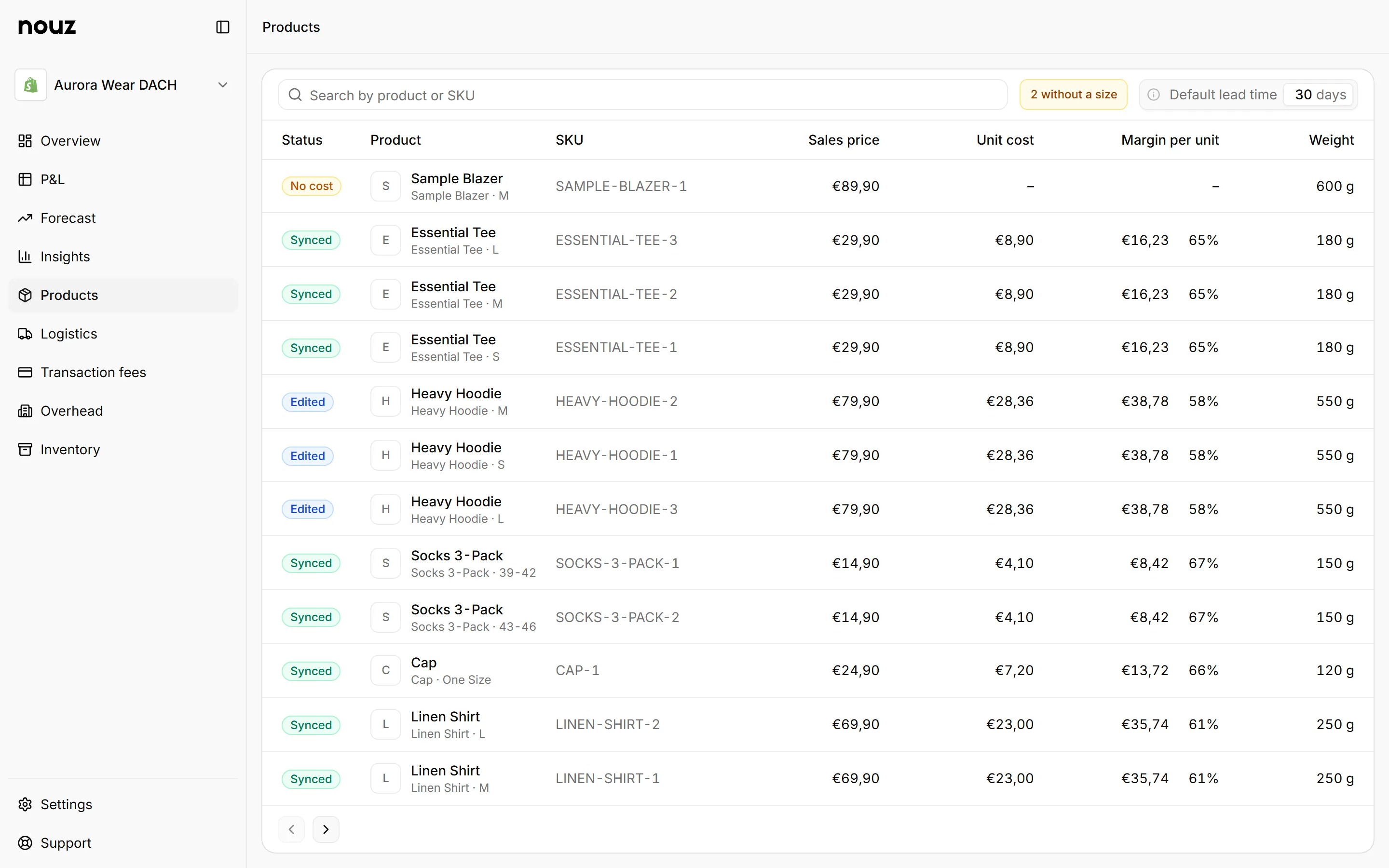
So that a sync never writes over something you typed. A sync is when nouz fetches your latest data from Shopify. Each field nouz can fill from Shopify remembers whose value it holds, Shopify's or yours. On the Products page, the Status column shows it: Synced, Edited or No cost. The Filter lists the three with their counts, and Shopify's cost differs as a fourth.
Synced means the unit cost came from Shopify and you have not changed it. Edited means you typed it, so it is yours for good. No cost means the variant has no unit cost for today yet. Status follows the unit cost only. Saving a weight or a size does not turn a row to Edited.
A variant's cost is copied from Shopify when Shopify has one and nouz does not. It then counts from your store's first order, so your whole history has a cost. While the row says Synced, nouz follows a change of Shopify's Cost per item: the old cost keeps the orders until that day, and the new one counts from the day nouz sees the change. nouz sees it at the next sync, Sync now included. A cost of yours planned for a later day stays, so Shopify's new cost counts only until yours starts. If Shopify no longer holds a Cost per item, nouz keeps counting the last one, and the line under the unit cost says so. To use your own price, enter it in nouz with the day it started. The sync never writes over a cost of yours: once one counts, it stays until you change it.
If Shopify's Cost per item differs from your own cost, the variant's page says so, and a blue dot after Edited marks the row on the list. Filter by Shopify's cost differs to see them all. Use Shopify's cost fills in Shopify's price as a new cost from the day nouz saw it change, or from today when that day is not known. If your own cost started on that day or later, it corrects your own cost instead. Nothing changes until you save, and the cost you save is yours, so the row stays Edited. Keep mine hides the notice and the dot until Shopify's cost changes again. Saving a cost of your own counts as Keep mine, so the notice does not come back for a difference you just made. If the cost you planned for a later day is Shopify's already, the page says so instead and offers Start it today, and the row has no dot.
Weight follows the same rule, with one difference: a weight counts for every order, old and new. While the weight is Shopify's, a change made in Shopify reaches nouz at the next sync and prices the shipping of past orders again, and the line under the field reads From Shopify until you change it. Once you type a weight on the variant's page, yours stays, and the line says so: Set in nouz, Shopify cannot overwrite it. Shopify's default of 0 g counts as unknown, not as weightless. Packaging size exists only in nouz, because Shopify has no such field.
This rule is what makes nouz safe to correct. Shopify catalogues often miss weights and costs. You fill the gaps here, and from then on your value is the one every number uses.
Where you find it Products
Was this answer helpful?
More in Setting up your costs
All 46 questions- 08 What is Reorder lead time on the Products page?
- 09 What does Save on a variant's page save?
- 10 Why does a cost show where it came from? You are reading this
- 11 What happens when a product has no weight?
- 12 Can I import my costs from a spreadsheet?
See what your store really kept yesterday.
Install nouz in minutes from the Shopify App Store. It imports every order your store has ever taken. Cancel anytime.