- nouz
- Help centre
- Account and security
- How do I export my data?
Account and security Answer 2 of 22 Updated
How do I export my data?
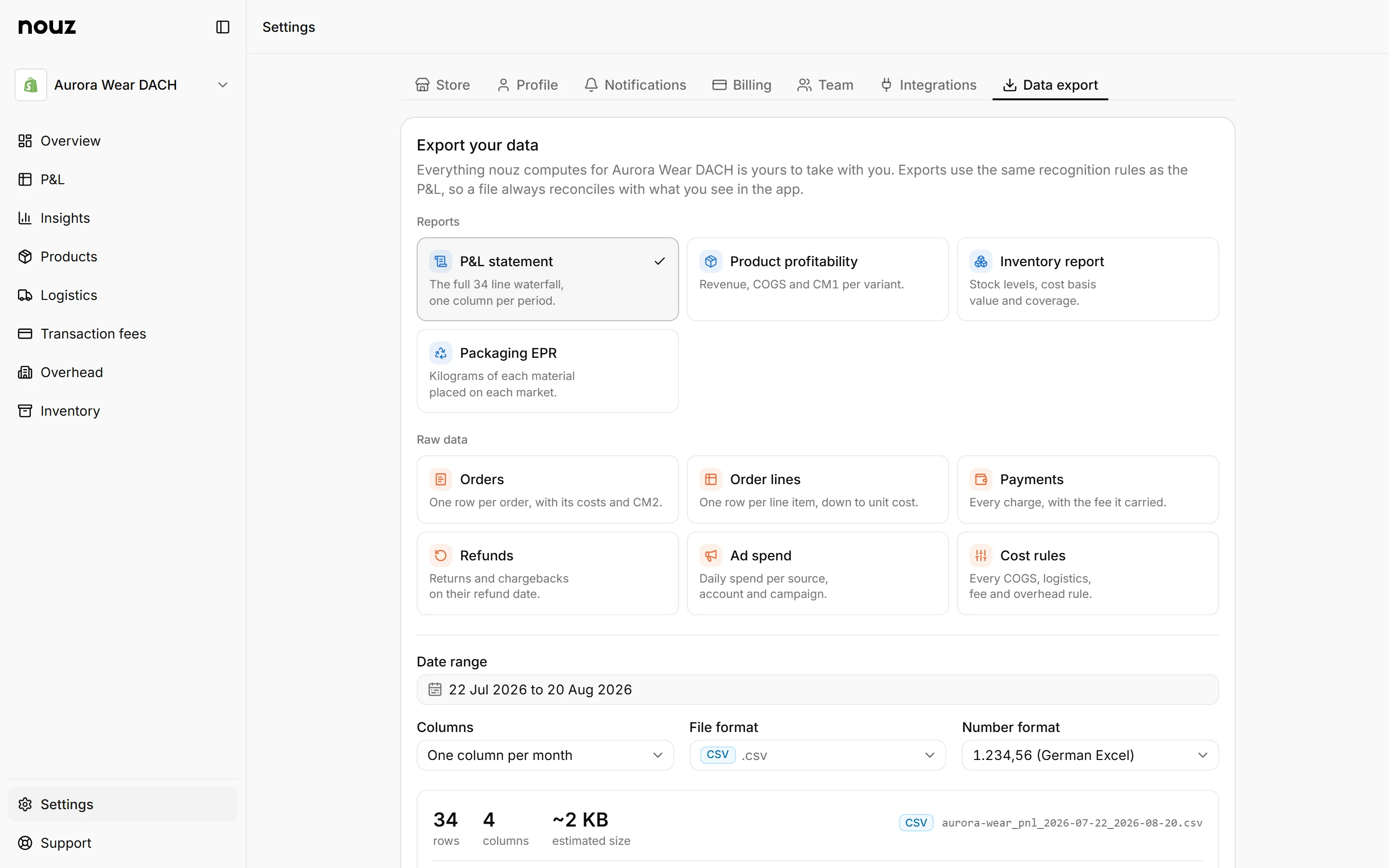
Open Settings, then the Data export tab. It works in three steps. First, pick What to export. Second, pick the dates and the format. Third, check the file before nouz makes it.
Step 1 has two groups. Reports are the P&L statement, Product profitability, the Inventory report and Packaging EPR. Raw data is Orders, Order lines, Payments, Refunds, Ad spend and Cost rules. Every report comes as CSV or Excel, and the raw data, from orders to cost rules, also as JSON. A CSV is a simple file that almost any program can open. Each tile shows how many rows it would export.
Step 2 has Dates, with quick picks like Last 30 days and a calendar. For the P&L, Columns gives one Total column, or a column per day, week or month. File picks the file type. For a CSV, Numbers picks the number format: 1.234,56 or 1234.56. Step 3 shows the file name, the number of rows and columns, the size and the first lines. Then click Export.
Your file appears under Recent exports, ready to download for seven days. Files are prepared in the background, and nouz emails you when one is ready. Anyone in the workspace can export, an Analyst too. On Base these individual exports pause while a paid month is past its order limit; the full account archive never does.
The full account export takes everything at once, and it is open on every plan. Take it before you delete your account.
Where you find it Settings · Data export
Was this answer helpful?
More in Account and security
All 22 questions- 01 Where is my data stored?
- 02 How do I export my data? You are reading this
- 03 What is in the full account export?
- 04 Which file format and number format should I choose for an export?
- 05 Where are my recent exports, and when do links expire?
See what your store really kept yesterday.
Install nouz in minutes from the Shopify App Store. It imports every order your store has ever taken. Cancel anytime.