- nouz
- Help centre
- Setting up your costs
- How do I add product costs?
Setting up your costs Answer 2 of 46 Updated
How do I add product costs?
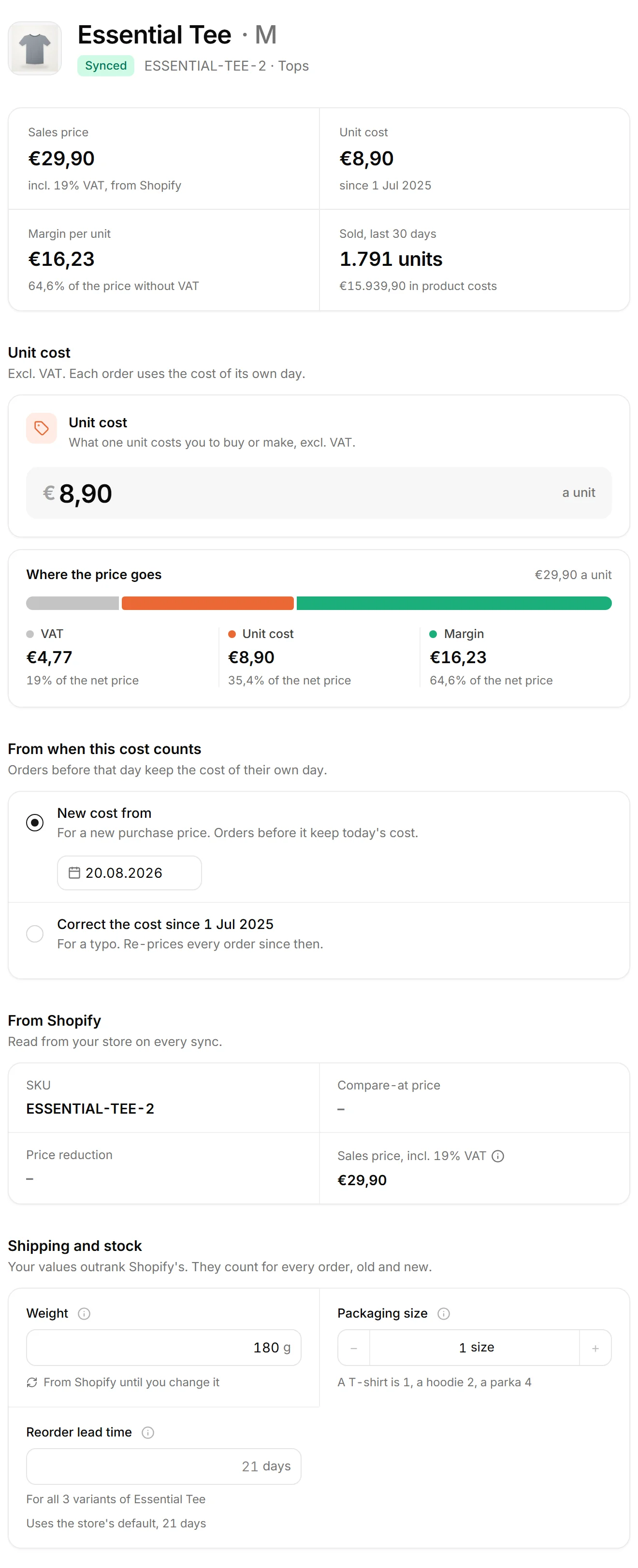
Open Products in the sidebar and click a variant. On its page, enter the Unit cost, check From when this cost counts, and click Save in the pill at the top. The unit cost is what you pay your supplier for one piece, without VAT. It is the first cost to set up. A variant without one reads Add its cost in the table.
Each variant has its own page and its own cost. A variant is one version of a product, like size M. A variant's first cost counts from your store's first order day, so every order you have synced gets it. A later price change starts today, or on the day you pick under New cost from. To enter a history, save the oldest cost first, then add each change with the day it started. A cost planned for a later day stays.
If Shopify already holds a cost for a product, nouz copies it for you, and the row says Synced. Once you enter your own, the row says Edited, and a sync never writes over it. The post on historical COGS on Shopify explains why Shopify cannot keep a history of costs. COGS means the cost of the goods you sold.
The same page holds what shipping needs to know: the weight and the packaging size. A missing one is flagged rather than guessed. You can also give the product its own reorder lead time there.
Costs are entered one by one, not imported from a file. If you keep supplier prices in your own spreadsheet, the product cost list template has the columns worth tracking. Variants without a cost come first in the table, and the Unit costs card has a button that lists only those, so you can work down the list.
Where you find it Products · a variant's page
Was this answer helpful?
More in Setting up your costs
All 46 questions- 01 Which costs should I set up first?
- 02 How do I add product costs? You are reading this
- 03 What does the Products page show?
- 04 What is Margin per unit on the Products page?
- 05 What do Compare-at price and Price reduction mean on the Products page?
See what your store really kept yesterday.
Install nouz in minutes from the Shopify App Store. It imports every order your store has ever taken. Cancel anytime.